PostgreSQL vs SQL Server Indexing & Query Plans: A Field Guide for .NET Developers
A practical comparison of indexing strategy, execution plans, and EF Core behavior across PostgreSQL and SQL Server — for .NET teams migrating between engines or running both, with real EXPLAIN and execution-plan output.
· 14 min read · Intermediate to Advanced
Key takeaways
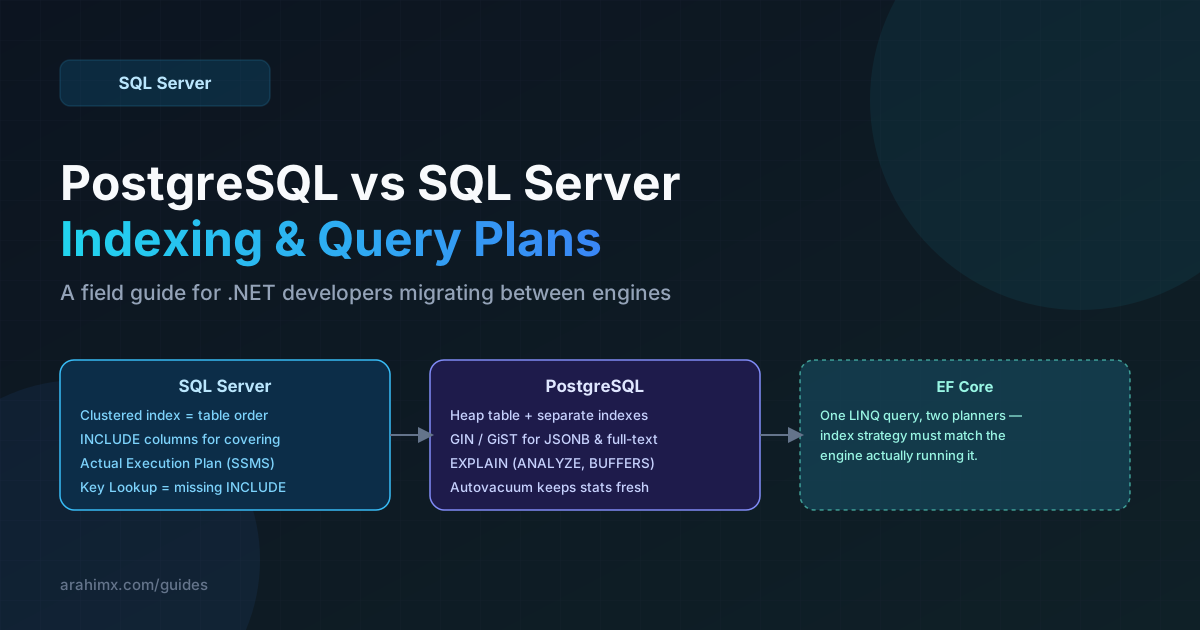
- Understand why SQL Server's clustered index and PostgreSQL's heap-plus-index model lead to different tuning decisions.
- Read SQL Server Actual Execution Plans and PostgreSQL EXPLAIN (ANALYZE, BUFFERS) output with confidence.
- Choose covering indexes (INCLUDE) vs PostgreSQL's index-only scans correctly for each engine.
- Recognize the EF Core query patterns that generate good SQL on one engine and terrible SQL on the other.
- Know when autovacuum tuning matters as much as indexing on PostgreSQL — a step SQL Server developers often miss entirely.
More .NET teams are running PostgreSQL alongside or instead of SQL Server than at any point before — Npgsql and EF Core's Postgres provider have matured to the point where switching engines is a realistic option, not just a Linux-shop thing. What doesn't automatically transfer is tuning intuition. An index strategy that's correct on SQL Server can be actively wrong on PostgreSQL, and the reason isn't syntax, it's that the two engines store data fundamentally differently.
1. The Storage Model Difference That Explains Everything Else
SQL Server's clustered index physically orders the table's rows on disk by the clustering key — the table's data and its primary structural index are the same thing. PostgreSQL has no equivalent by default: every table is a heap, rows live wherever they were inserted, and every index (including the primary key) is a separate structure that points back into the heap via a row identifier called a ctid. That one difference is why so much SQL Server tuning advice doesn't translate directly.
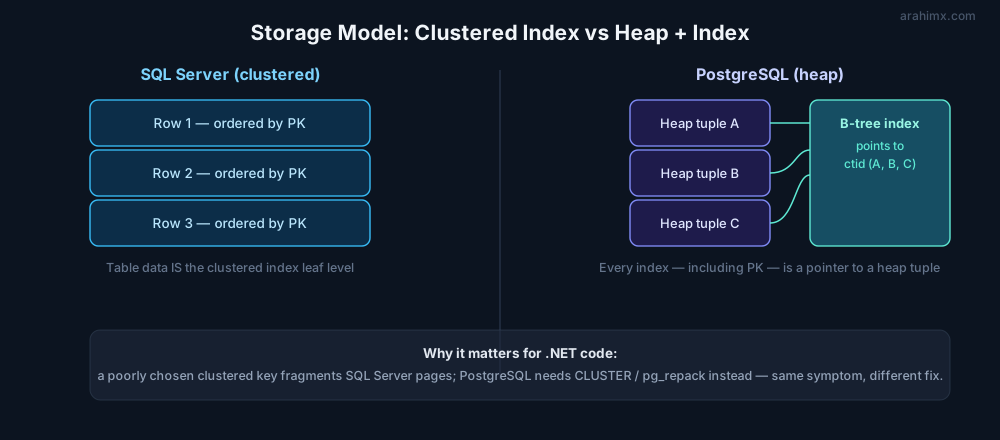
The practical consequence: a badly chosen clustering key on SQL Server fragments the table itself, and the fix is rebuilding the clustered index. A badly maintained PostgreSQL heap suffers from bloat instead — dead tuples left behind by updates and deletes that autovacuum hasn't reclaimed yet — and the fix is a VACUUM, or in extreme cases CLUSTER / pg_repack to physically reorder the heap to match an index. Same symptom (queries getting slower over time), different root cause, different fix.
2. Covering Indexes vs Index-Only Scans
Both engines let you avoid a trip back to the full row when an index alone has everything a query needs — but they get there differently, and the terminology trips people up.
-- SQL Server: covering index via INCLUDE
-- Query needs OrderId, CustomerId (key columns) plus Status and Total (payload)
CREATE NONCLUSTERED INDEX IX_Orders_CustomerId
ON Orders (CustomerId)
INCLUDE (Status, Total);

-- Query plan shows "Index Seek" with no Key Lookup when this index covers the query fully.
SELECT OrderId, CustomerId, Status, Total
FROM Orders
WHERE CustomerId = 4821;
-- PostgreSQL: same intent, different index type
-- A plain B-tree index CAN cover a query and produce an index-only scan,
-- but ONLY if the visibility map shows those pages have no uncommitted changes.
CREATE INDEX idx_orders_customerid ON orders (customer_id)
INCLUDE (status, total);
EXPLAIN (ANALYZE, BUFFERS)
SELECT order_id, customer_id, status, total
FROM orders
WHERE customer_id = 4821;
-- Look for "Index Only Scan" in the plan output — a plain "Index Scan" means
-- it still had to visit the heap, usually because VACUUM hasn't run recently.3. Reading Execution Plans: SSMS vs EXPLAIN ANALYZE
SQL Server developers lean on SSMS's graphical Actual Execution Plan — thick arrows for expensive operators, a Key Lookup icon that's practically a red flag by itself. PostgreSQL's equivalent is textual: EXPLAIN (ANALYZE, BUFFERS) against the actual query, which is the Postgres analogue of SQL Server's "Actual" (not "Estimated") plan — it really executes the query and reports real row counts and real timings, not just the planner's guess.
EXPLAIN (ANALYZE, BUFFERS, FORMAT TEXT)
SELECT o.order_id, o.total, c.name
FROM orders o
JOIN customers c ON c.customer_id = o.customer_id
WHERE o.status = 'pending';

-- Key things to scan for in the output:
-- 1. "Seq Scan" on a large table where you expected an index to be used
-- 2. "rows=X" (planner estimate) vs "actual rows=Y" — a large gap means stale statistics
-- 3. "Buffers: shared hit=N read=M" — a high "read" count means data came from disk, not cache
The single most useful habit to import from SQL Server tuning into PostgreSQL work is comparing estimated vs actual row counts. In SSMS that's the tooltip on each operator; in EXPLAIN ANALYZE it's the rows=X actual rows=Y pair on every node. A big gap in either engine means the query planner's statistics are stale, and the fix is the same intent, different command — UPDATE STATISTICS in SQL Server, ANALYZE in PostgreSQL.
4. EF Core Query Patterns That Hurt on One Engine, Not the Other
The same LINQ query compiles to genuinely different SQL depending on which EF Core provider is active, and a pattern that's harmless on SQL Server can be an accidental full scan on PostgreSQL, or vice versa.
// This pattern is fine on SQL Server (parameter sniffing aside) but on PostgreSQL,
// a naive client-evaluated .Contains() over a large in-memory list generates
// a huge "= ANY(ARRAY[...])" clause that skips the index if the list is big enough.
var activeIds = await GetActiveCustomerIdsAsync(); // could be thousands of ids

var orders = await _db.Orders
    .Where(o => activeIds.Contains(o.CustomerId))
    .ToListAsync();

// Better on both engines for large id sets: push the join into SQL via a
// temp table (SQL Server) or an unnested array parameter (PostgreSQL), or
// simply page the query instead of materializing the full id list client-side.
Case sensitivity is the other recurring surprise. SQL Server's default collation is case-insensitive, so WHERE Name = 'widget' matches 'Widget' without anyone writing a single line of code for it. PostgreSQL string comparison is case-sensitive by default — the equivalent EF Core LINQ query silently returns zero rows on Postgres unless you explicitly use ILIKE, a citext column, or a case-insensitive collation. It's one of the most common "why does this work in Staging but not in the Postgres environment" bugs in mixed-engine teams.
5. Maintenance: Index Rebuilds vs Autovacuum Tuning
SQL Server developers are used to scheduling index rebuild/reorganize jobs and calling it maintenance solved. PostgreSQL's equivalent concern is autovacuum, and the default settings are tuned conservatively for small databases — a busy production table can easily out-write autovacuum's default thresholds, accumulating bloat that no amount of index tuning will fix, because the query is fast in theory but every heap page it scans is half dead tuples.
-- PostgreSQL: check for table bloat and autovacuum lag on a hot table
SELECT relname, n_live_tup, n_dead_tup,
       round(n_dead_tup::numeric / NULLIF(n_live_tup, 0) * 100, 1) AS dead_pct,
       last_autovacuum, last_autoanalyze
FROM pg_stat_user_tables
WHERE relname = 'orders';

-- If dead_pct is climbing and last_autovacuum is stale, tune per-table:
ALTER TABLE orders SET (autovacuum_vacuum_scale_factor = 0.05, autovacuum_analyze_scale_factor = 0.02);
On SQL Server, a slow query is almost always an indexing problem. On PostgreSQL, check autovacuum lag before you touch a single index — you can add the perfect index to a bloated table and the query will still be slow.
Summary & Key Takeaway
Treat the two engines' storage models as the root cause, not the index syntax differences. SQL Server tuning is fundamentally about picking the right clustering key and minimizing Key Lookups; PostgreSQL tuning is about keeping the heap healthy via autovacuum and getting the planner's statistics to reflect reality. If you're running EF Core against both, write your covering indexes for each engine explicitly rather than assuming a migration that works on one produces good execution plans on the other — because it usually doesn't.